Introducing DriftNotes — A Minimal Journaling System for Everyday Writing
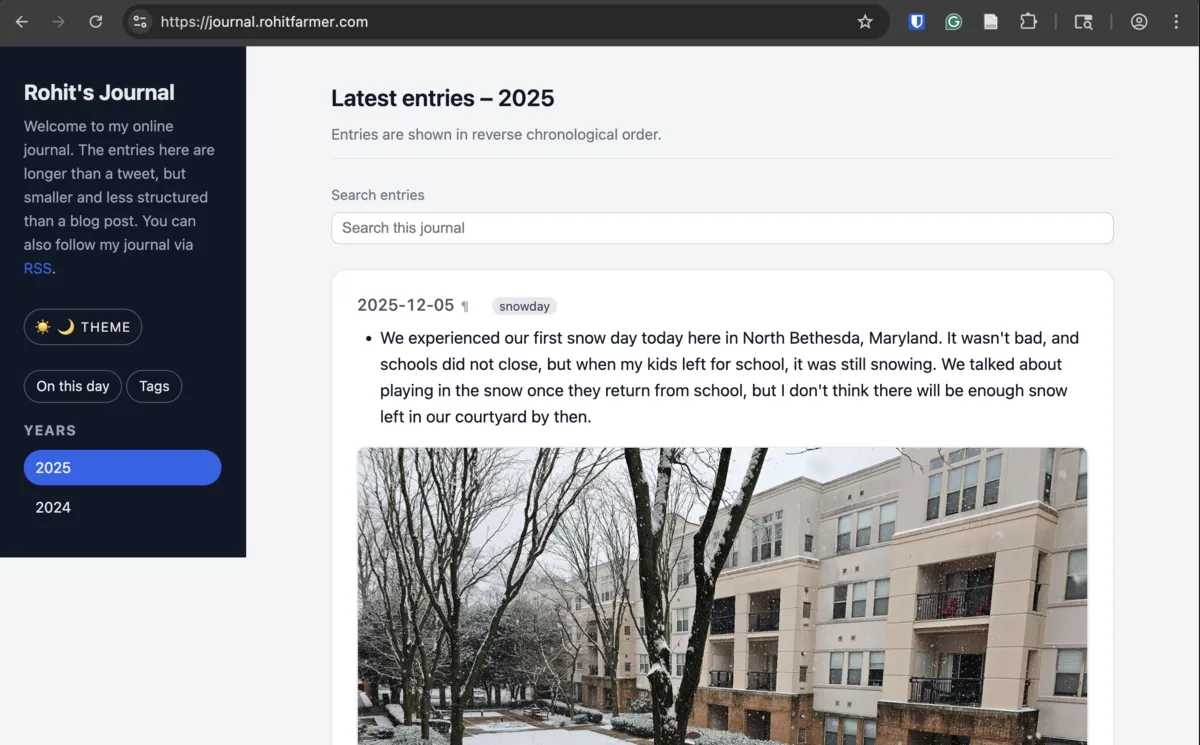
For the past several years, I’ve been experimenting with different ways of maintaining a personal journal. I tried everything: paper notebooks, digital notes, blogging platforms, custom Markdown workflows, and even small private CMS-like systems. All of them worked to some extent, but none of them struck the balance I wanted.
Most tools fall into one of two extremes:
- Social media, which encourages short, impulsive posts that disappear into a timeline.
- Blogging platforms, which feel too formal for quick daily notes or reflections.
I wanted something in between — a space for small but meaningful entries, longer than a tweet but far less structured than a blog post. A place where I could drop thoughts, observations, or moments from each day without turning it into an essay.
That search eventually led me to build something for myself: DriftNotes. That I now use to generate my online journal at https://journal.rohitfarmer.com/.
Why I Created DriftNotes
Over time, my journaling style became more fragmented. Some days I’d write paragraphs; other days, just a few lines and an image. But I still wanted:
- a clean, minimalist reading experience
- local files I fully control
- a private-first workflow
- the ability to publish selected entries on my website
- less dependencies on centralized services
- fast builds, simple HTML, and complete portability
No existing tool truly matched this philosophy. So I built one.
DriftNotes grew out of a simple idea:
Write your daily entries in plain Markdown, organized by month and year, and let a minimal static site generator turn them into a beautiful, searchable journal.
That’s all.
- No database.
- No logins.
- No frameworks.
- No “rich text editors.”
- Just Markdown → HTML.
Initially, this started as a handful of scripts I wrote for my personal journaling site. Over time, I kept adding features that made sense for daily use — nothing more, nothing less.
Eventually, I realized I had built something I wanted to share.
How DriftNotes Works
DriftNotes is intentionally simple to understand and use.
- Every year gets its own folder (like
2025/). - Every month is a Markdown file (
2025-11.md,2025-12.md, etc.). - Each entry starts with a heading that contains the date.
- You can optionally add tags or mark an entry as a draft (to not include in the HTML output).
The build script — just a single Python file — processes everything and generates a static website with:
Clean HTML pages for each year
Entries appear in reverse chronological order.
Tag support
Add tags to entries and DriftNotes automatically creates:
- tag pages
- a tag index
- tag pills under each entry
“On This Day” page
A fun way to revisit past moments from different years.
Dark mode toggle
No frameworks, no heavyweight UI — just clean CSS + a tiny JS file.
Offline search with Lunr.js
Search your entire journal instantly, without sending anything to a server.
RSS feed for the latest year
Useful if you or others want to follow your journal via an RSS reader.
Fully static output
Everything goes into a _site/ folder (or wherever you choose). You can publish it anywhere: Nginx, GitHub Pages, Netlify (which I use), a pubnix, or even on a USB drive.
How I Use DriftNotes
On my local machine, I keep a folder structure like:
content/
  2024/
    2024-01.md
    2024-02.md
  2025/
    2025-12.md
    2025-11.md
config.yml
driftnotes
Every day, I add a new entry under the appropriate month’s file. Some days it’s a paragraph; some days it’s several. I include images, tags, and small reflections.
# December 2025
## 2025-12-05
tags: snowday
We experienced our first snow day today here in North Bethesda, Maryland. It wasn't bad, and schools did not close, but when my kids left for school, it was still snowing. We talked about playing in the snow once they return from school, but I don't think there will be enough snow left in our courtyard by then.
When I run:
python3 driftnotes/build.py config.ymlthe system generates a complete journal site in _site folder which I then serve through Netlify.
I use it for:
- my daily personal notes
- short reflections that don’t belong on my main blog
- photo + text entries about family moments
- capturing ideas, inspirations, and small insights
- documenting hikes, trips, and things I learn along the way
Some entries I publish publicly. Some remain private. The beauty of DriftNotes is that the source files are yours — portable, readable, and future-proof.
Now Available for Others to Use
DriftNotes was originally designed just for me, but I realized that others might appreciate a minimal tool that sits between social media and a traditional blog.
So I’ve cleaned it up, documented it, added a proper structure, and released it publicly.
If you like:
- small tools
- plain text
- journaling
- static site generators
- privacy and simplicity
…then you might enjoy using DriftNotes.
You can explore the repository here: https://github.com/rohitfarmer/driftnotes
It’s released under the MIT license, and the GitHub repository can be dropped directly into your own project. You only maintain your Markdown files and a simple config.yml — DriftNotes handles the rest.
If there’s community interest, I may extend it with more features. For now, it’s intentionally focused and minimal.
Closing Thoughts
DriftNotes reflects a philosophy that has increasingly shaped my online writing:
Not everything needs to be a blog post, and not everything should be a tweet. There’s value in the quiet, steady space in between.
If you try DriftNotes, or build something with it, I’d love to hear from you. This little project already brings joy to my own journaling routine — I hope it can do the same for someone else.
Feel free to write to me at rohit@rohitfarmer.com